Arms itself
Set the hours it should be armed. Disarm early with the remote and it re-arms after a gap you choose.
Home alarm · 24 GHz K-band radar
Radar sensors notice a person moving in your home. The hub sounds the siren and switches on the lights at once, and every phone you choose rings about two seconds later, even with the app closed.
Film · 1 min 15 s
From the first movement to the alarm on your phone, then a tour of the app and the remote.
How it senses
Each sensor sends out a faint 24 GHz radio signal and listens to its echo. When a person moves, the echo changes.
Intelligent detection algorithms tell that change apart from background noise, so the alarm answers to real movement.
When someone gets in
While the system is armed, any sensor that notices a person starts the alarm.
The hub sounds the siren for the time you set and switches the lights on, so the intruder knows they have been seen.
An alarm on your phone and on everyone you share with, saying which sensor and where.
Family coming home early? Disarm with A or in the app. Otherwise let it sound, press D for panic, or call for help.
The app
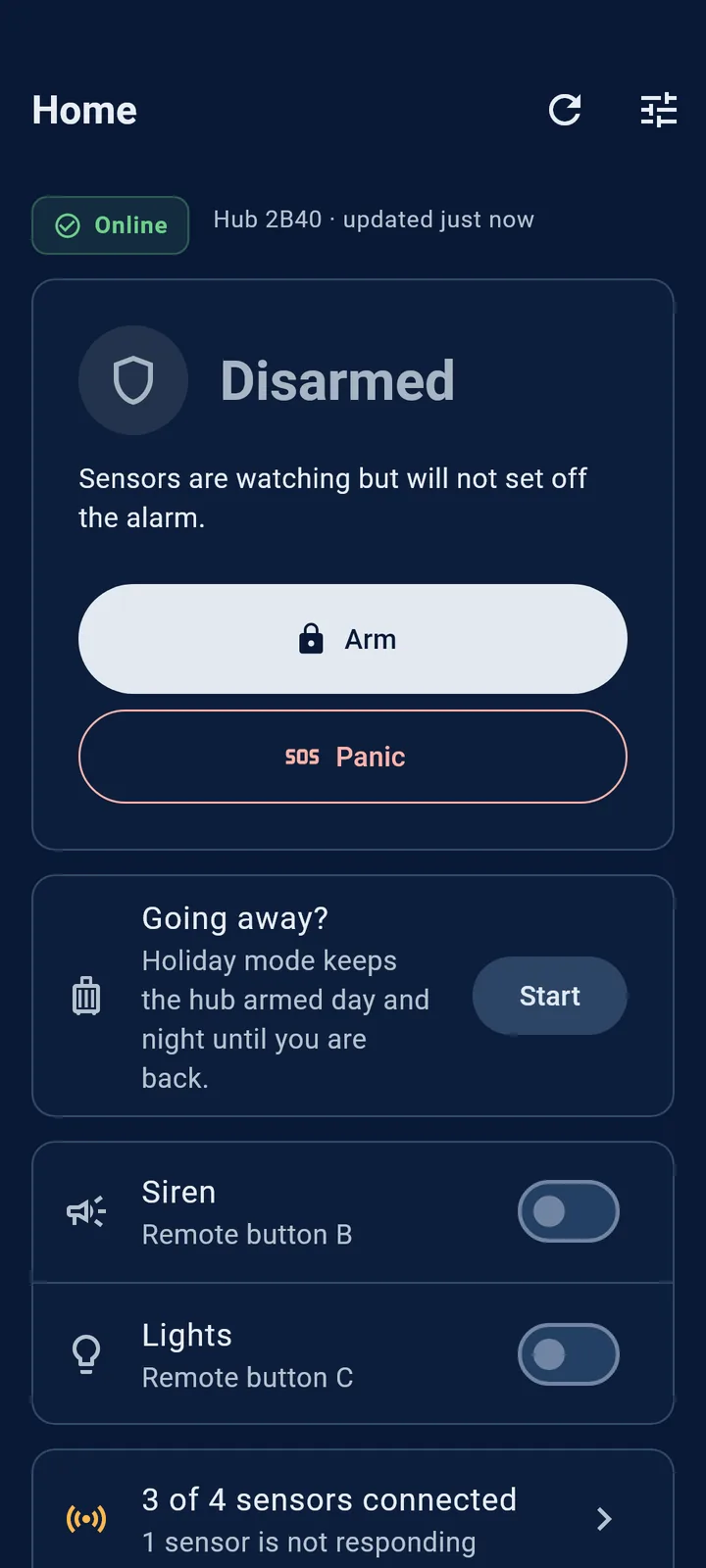
The hub's state at a glance, checked live whenever you open the app.
One big button to arm or disarm from anywhere, and panic when you need help now.
Pick the day you are back; the hub stays armed around the clock until then.
Switch them while disarmed, the same as B and C on the remote.
Real screens from the Smart Sentry app for Android, shown with sample data.
The remote
Press A to arm the demo hub.
During panic only A, D or the app end it. B and C do nothing until panic is over.
Built for real homes
Set the hours it should be armed. Disarm early with the remote and it re-arms after a gap you choose.
Armed day and night until the day you are back, without touching the schedule.
Give family or staff their own access: view only, operate, or manage settings. Remove it any time.
Name every sensor and set its sensitivity; its light glows amber while you do.
The hub reports its health once a day and tells you if a sensor stops responding, without nagging about every blip.
If the internet drops, the sensors, siren and remote keep protecting your home, and the app says the hub is offline.
Private by design
Protecting your home should not mean filming it.
No cameras, no microphones. Nothing is filmed or recorded.
Your arming history stays home. It is kept on the hub, not on our servers.
Alerts do not pile up. They delete themselves after 90 days, and Clear empties your list any time.
No ads, no tracking, never sold. Read the privacy policy.
Questions
Yes. Each sensor contains a 24 GHz K-band radar: a very low-power radio that notices movement from its echo. It needs no light and records nothing.
An internet router with a free network port for the hub, and a power point for the hub and for each sensor. The app runs on Android phones today; iPhone support is on the way.
Without internet the hub, sensors, siren and remote keep working at home, and the app tells you the hub is offline. After a power cut the hub comes back the way it was, armed or disarmed, and the app shows that it restarted.
Press A on the remote or Disarm in the app. During panic, press A or D, or end it in the app.
Each sensor's sensitivity can be turned down in the app, and sensors work best pointed at doorways and passages that people use.
Up to seven. Each has its own name in the app, so you know exactly where movement was picked up.
Yes. Share access from the app and everyone you add gets the alarms on their own phone. You choose what each person may do.
Get the app
You set up and run your system from it. Everyone you share access with needs it too, so the alarm reaches their phone.
Older phone? Get the 32-bit version (20 MB).
On an iPhone? The iPhone app is not available yet. Email us and we will tell you when it is.


Order
Smart Sentry is made in small batches. Tell us where you live and how many rooms to cover, and we will come back to you.
Request received
We will contact you soon to confirm the price and delivery. Keep this reference in case you need to ask about it: